Tag Cloud

CRM 2011 (161) CRM 4.0 (144) C# (116) JScript (109) Plugin (92) Registry (90) Techpedia (77) PyS60 (68) WScript (43) Plugin Message (31) Exploit (27) ShellCode (26) FAQ (22) JavaScript (21) Killer Codes (21) Hax (18) VB 6.0 (17) Commands (16) VBScript (16) Quotes (15) Turbo C++ (13) WMI (13) Security (11) 1337 (10) Tutorials (10) Asp.Net (9) Safe Boot (9) Python (8) Interview Questions (6) video (6) Ajax (5) VC++ (5) WebService (5) Workflow (5) Bat (4) Dorks (4) Sql Server (4) Aptitude (3) Picklist (3) Tweak (3) WCF (3) regex (3) Config (2) LINQ (2) PHP (2) Shell (2) Silverlight (2) TSql (2) flowchart (2) serialize (2) ASHX (1) CRM 4.0 Videos (1) Debug (1) FetchXml (1) GAC (1) General (1) Generics (1) HttpWebRequest (1) InputParameters (1) Lookup (1) Offline Plug-ins (1) OutputParameters (1) Plug-in Constructor (1) Protocol (1) RIA (1) Sharepoint (1) Walkthrough (1) Web.config (1) design patterns (1) generic (1) iframe (1) secure config (1) unsecure config (1) url (1)

Pages

Tuesday, November 19, 2013

Retrieving all fields inside a CRM form

If you want to loop over all fields (input fields) on a CRM form, you can use the following script


//CRM 4 Jscript


for (var index in crmForm.all) {
var control = crmForm.all[index];

if (control.req && (control.Disabled != null)) {
//control is a CRM form field
}
}


The conditions mean that a control must have the "req" attribute and the "Disabled" method. This seems a good indicator for a CRM form field.

Monday, October 21, 2013

Complete Installation guide for CRM 4.0

Complete Installation guide for CRM 4.0 / Step by Step guide to install CRM 4.0

        Last week I installed Microsoft Dynamic 4.0 on my virtual machine and I found that it will be helpful for beginner like me, if there is a step by step installation guide. Lets start with OS selection.

1. You can use Windows Server 2003 or later server version. I had Windows Server 2003 R2.

2. Install latest service pack for OS you installed.

3. Install Internet Information Service.

4. Install Active Directory.

5. Configure DNS Server.

6. Create new user for domain and make him member of Administrators group.

7. Install SQL Server 2005 with Reporting Service and Analysis service.

8. Configure new account as service account for Report Server and Analysis server.

9. Install Visual Studio 2008.

10. Start installation of CRM 4.0

11. Enter display name for your Organization.

clip_image001

12. Next step is to select installation path, you can leave this as it is or select specific folder,

clip_image002

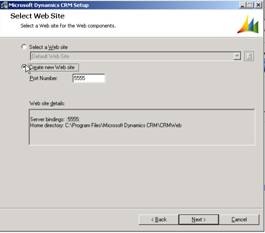
13. Next select website for CRM, I choose new website with different port address in my case it was 5555 as shown in image below,

clip_image003

14. Next you need to enter URL for Reporting server.

15. Next you have to select Organization Unit. Click on Browse button and select the root node of your domain in my case it is chirag.

clip_image004

16. On next step you need to specify security account, choose the one you created in step 6. Enter the password in password textbox and click next.

17. Select your local machine as Email Router setting or select specific machine on domain which you are using at email server. I chose my local machine so localhost.

18. Once you click next you will see System Requirements screen. If Domain user, SQL Server Reporting Service and ASP.NET are installed properly you will receive no error or warning else you will receive error message. I received following errors,

clip_image005

19. If you receive error message for SQL Server or SQL Server Reporting Service don’t be afraid. Open Services from Start – All Programs – Administrative Tools – Services. Check whether SQL Server Agent is running. If not right click on service and select property. Select Startup Type as Automatic and click on start button.

20. Another common error is for Indexing service. Follow the steps mention in point 19 to start Indexing Service.

21. You can see a warning mentioning Verify Domain User account SPN for the Microsoft Dynamics CRM ASP.NET Application Pool account. This will usually shows when you add specific domain account for security account in step 16.

22. If System Requirements screen show no error or warning on next step installation will be started.

23. Finally you will see following screen, this means your CRM is installed.

clip_image006

Thursday, October 17, 2013

Removing a navigation bar entry at runtime

To remove a navigation bar entry dynamically, you can use the following code:

var navigationBarEntry = document.getElementById("navProds");

if (navigationBarEntry != null) {
var lbArea = navigationBarEntry.parentNode;
if (lbArea != null) {
lbArea.removeChild(navigationBarEntry);
}
}

If you haven't already done it, download and install the Internet Explorer Developer Toolbar to find the name of the navigation bar entry.

Friday, September 20, 2013

Retrieving the current user information

The new solution uses the Microsoft CRM web services to retrieve the user id, business unit id, organization id and the first, last and full name of the currently logged on user. I have attached a simple test form with the following OnLoad event:


var xml = "" +
"" +
"" +
GenerateAuthenticationHeader() +
" " +
" " +
" " +
" systemuser" +
" " +
" " +
" businessunitid" +
" firstname" +
" fullname" +
" lastname" +
" organizationid" +
" systemuserid" +
"
" +
"
" +
" false" +
" " +
" And" +
" " +
" " +
" systemuserid" +
" EqualUserId" +
"
" +
"
" +
"
" +
"
" +
"
" +
"
" +
"
" +
"";

var xmlHttpRequest = new ActiveXObject("Msxml2.XMLHTTP");

xmlHttpRequest.Open("POST", "/mscrmservices/2007/CrmService.asmx", false);
xmlHttpRequest.setRequestHeader("SOAPAction", "http://schemas.microsoft.com/crm/2007/WebServices/RetrieveMultiple");
xmlHttpRequest.setRequestHeader("Content-Type", "text/xml; charset=utf-8");
xmlHttpRequest.setRequestHeader("Content-Length", xml.length);
xmlHttpRequest.send(xml);

var resultXml = xmlHttpRequest.responseXML;
var entityNode = resultXml.selectSingleNode("//RetrieveMultipleResult/BusinessEntities/BusinessEntity");

var firstNameNode = entityNode.selectSingleNode("q1:firstname");
var lastNameNode = entityNode.selectSingleNode("q1:lastname");
var fullNameNode = entityNode.selectSingleNode("q1:fullname");
var systemUserIdNode = entityNode.selectSingleNode("q1:systemuserid");
var businessUnitIdNode = entityNode.selectSingleNode("q1:businessunitid");
var organizationIdNode = entityNode.selectSingleNode("q1:organizationid");

crmForm.all.sw_firstname.DataValue = (firstNameNode == null) ? null : firstNameNode.text;
crmForm.all.sw_lastname.DataValue = (lastNameNode == null) ? null : lastNameNode.text;
crmForm.all.sw_name.DataValue = (fullNameNode == null) ? null : fullNameNode.text;
crmForm.all.sw_systemuserid.DataValue = (systemUserIdNode == null) ? null : systemUserIdNode.text;
crmForm.all.sw_businessunitid.DataValue = (businessUnitIdNode == null) ? null : businessUnitIdNode.text;
crmForm.all.sw_organizationid.DataValue = (organizationIdNode == null) ? null : organizationIdNode.text;

Tuesday, September 10, 2013

Web Service Interview Questions

1. What is Web service?

Web Services are applications that provide services on the internet. Web services allow for programmatic access of business logic over the Web. Web services typically rely on XML-based protocols, messages, and interface descriptions for communication and access. SOAP over HTTP is the most commonly used protocol for invoking Web services. SOAP defines a standardized format in XML which can be exchanged between two entities over standard protocols such as HTTP.

Example: Google search engine's web service, e.g., allows other applications to delegate the task of searching over the internet to Google web service and use the result produced by it in their own applications.

2. What is UDDI?

UDDI - Universal Description, Discovery and Integration. It is an XML-based standard for describing, publishing, and finding Web services. It is platform independent, open framework and specification for a distributed registry of Web services

3. What is DISCO?

DISCO is the abbreviated form of Discovery. It is basically used to club or group common services together on a server and provides links to the schema documents of the services it describes may require.

4. What is the use of Disco.exe?

The Web Services Discovery tool discovers the URLs of XML Web services located on a Web server and saves documents related to each XML Web service on a local disk.

5. What are the uses of Web service?
  • Application integration Web services within an intranet are commonly used to integrate business applications running on different platforms.

    For example, a .NET client running on Windows 2000 can easily invoke a Java Web service running on a mainframe or Unix machine to retrieve data from a legacy application.

  • Business integration Web services allow trading partners to engage in e-business allowing them to leverage the existing Internet infrastructure. Organizations can send electronic purchase orders to suppliers and receive electronic invoices. Doing e-business with Web services means a low barrier to entry because Web services can be added to existing applications running on any platform without changing legacy code.
  • Commercial Web services focus on selling content and business services to clients over the Internet similar to familiar Web pages. Unlike Web pages, commercial Web services target applications as their direct users.
6. What is WSDL?

The Web Services Description Language (WSDL) is a particular form of an XML Schema, developed by Microsoft and IBM for the purpose of defining the XML message, operation, and protocol mapping of a web service accessed using SOAP or other XML protocol.

WSDL describes the details such as

  • Where we can find the Web Service (its URI)?
  • What are the methods and properties that service supports?
  • Data type support.
  • Supported protocols
7. How to create a web service?

This sample explains about the creation of sample web service and consuming it.

Step 1: Create a new web service by clicking File->New->WebSite and select "ASP.Net Web Service"

Step 2:

Create a class and methods which is need to be exposed as service. Decorate the class with "WebService" and methods with "WebMethod" attribute.

[WebService(Namespace = "http://tempuri.org/")]
[WebServiceBinding(ConformsTo = WsiProfiles.BasicProfile1_1)]
// To allow this Web Service to be called from script,
//using ASP.NET AJAX, uncomment the following line.
// [System.Web.Script.Services.ScriptService]

public class Service : System.Web.Services.WebService
{
public Service () {

//Uncomment the following line if using designed components
//InitializeComponent();
}

[WebMethod]
public string HelloWorld() {
return "Hello World";
}

[WebMethod ]
public string SayHello(string name) {
return "Hello " + name;
}

}


Step 3:

Run the web service


Step 4: Create the client application to consume the service by clicking File->New->Project and select the Console Application.

Step 5: Right click the project file and select "Add Service Reference"


Step 6:

Create a new instance for proxy class and call the web method "SayHello"

class Program
{
static void Main(string[] args)
{
ServiceReference1.ServiceSoapClient proxy = new
ServiceReference1.ServiceSoapClient();
Console.WriteLine(proxy.SayHello("Ram"));
Console.ReadLine();
}
}


Step 7:

Output window are shown


8. What is difference between Add Reference and Add Service reference?

Add Reference is used to add the .Net assemblies and COM components to the project files, where as Add Service Reference is used to create a proxy for the web service.

9. What is the transport protocol you use to call a Web service?

SOAP (Simple Object Access Protocol) is the preferred protocol.

10. Where on the Internet would you look for Web services?

http://www.uddi.org

11. To test a Web Service you must create a windows application or web application to consume this service? It is True/False?

Every web service by default generates a test page, we need not create or consume the Web service in order to test it.

12. When would you use .NET Remoting and when Web services?

When both service and client are .Net platform, .Net remoting will be more efficient where are if both server and client are different platform use web service for communication

13. A Web service can only be written in .NET True or False?

False

14. How to implement security to the web service?

WS-Security (Web Services Security) is a communications protocol providing a means for applying security to Web services.

The protocol contains specifications on how integrity and confidentiality can be enforced on Web services messaging. The WSS protocol includes details on the use of SAML and Kerberos, and certificate formats such as X.509

WS-Security describes how to attach signatures and encryption headers to SOAP messages. In addition, it describes how to attach security tokens, including binary security tokens such as X.509 certificates and Kerberos tickets, to messages.

WS-Security incorporates security features in the header of a SOAP message, working in the application layer. Thus it ensures end-to-end security.

Friday, August 02, 2013

Comment your code

Following are 13 tips on how to comment your source code so that it is easier to understand and maintain over time.

1. Comment each level

Comment each code block, using a uniform approach for each level.  For example:

  • For each class, include a brief description, author and date of last modification
  • For each method, include a description of its purpose, functions, parameters and results

Adopting comment standards is important when working with a team.  Of course, it is acceptable and even advisable to use comment conventions and tools (such as XML in C# or Javadoc for Java) to facilitate this task.

2. Use paragraph comments

Break code blocks into multiple “paragraphs” that each perform a single task, then add a comment at the beginning of each block to instruct the reader on what is about to happen.

// Check that all data records
// are correct
foreach (Record record in records)
{
    if (rec.checkStatus()==Status.OK)
    {
        . . .
    }
}
// Now we begin to perform
// transactions
Context ctx = new ApplicationContext();
ctx.BeginTransaction();
. . .
3. Align comments in consecutive lines

For multiple lines of code with trailing comments, align the comments so they will be easy to read.

const MAX_ITEMS = 10; // maximum number of packets
const MASK = 0x1F;    // mask bit TCP

Some developers use tabs to align comments, while others use spaces.  Because tab stops can vary among editors and IDEs, the best approach is to use spaces.

4. Don’t insult the reader’s intelligence

Avoid obvious comments such as:

if (a == 5)      // if a equals 5
    counter = 0; // set the counter to zero

This wastes your time writing needless comments and distracts the reader with details that can be easily deduced from the code.

5. Be polite

Avoid rude comments like, “Notice the stupid user has entered a negative number,” or “This fixes the side effect produced by the pathetically inept implementation of the initial developer.”  Such comments do not reflect well upon their author, and you never know who may read these comments in the future: your boss, a customer, or the pathetically inept developer you just insulted.

6. Get to the point

Don’t write more in comments than is needed to convey the idea.  Avoid ASCII art, jokes, poetry and hyperverbosity.  In short, keep the comments simple and direct.

7. Use a consistent style

Some people believe that comments should be written so that non-programmers can understand them.  Others believe that comments should be directed at developers only.  In any event, as stated in Successful Strategies for Commenting Code, what matters is that comments are consistent and always targeted to the same audience.  Personally, I doubt many non-developers will be reading code, so comments should target other developers.

8. Use special tags for internal use

When working on code as a team, adopt a consistent set of tags to communicate among programmers.  For example, many teams use a “TODO:” tag to indicate a section of code that requires additional work:

Thursday, July 25, 2013

C# Code for Sending Email to Unresolved Recipients

this will send email to unresolved recipient.
private void SendEmailToUnresolvedRecent(IOrganizationService prmCrmService, string 
prmToRecipientEmailAddress, Guid prmSenderUserId, string prmSubject, string prmMessageBody)
{

// Email record id
Guid wod_EmailId = Guid.Empty;

// Creating Email 'to' recipient activity party entity object
Entity wod_EmailToReciepent = new Entity("activityparty");

// Creating Email 'from' recipient activity party entity object
Entity wod_EmailFromReciepent = new Entity("activityparty");

// Assigning receiver email address to activity party addressused attribute
//wod_EmailToReciepent["participationtypemask"] = new OptionSetValue(0);
wod_EmailToReciepent["addressused"] = prmToRecipientEmailAddress;

// Setting from user account
wod_EmailFromReciepent["partyid"] = new EntityReference("systemuser", prmSenderUserId);

// Creating Email entity object
Entity wod_EmailEntity = new Entity("email");

// Setting email entity 'to' attribute value
wod_EmailEntity["to"] = new Entity[] { wod_EmailToReciepent };

// Setting email entity 'from' attribute value
wod_EmailEntity["from"] = new Entity[] { wod_EmailFromReciepent };

// Setting email subject and description
wod_EmailEntity["subject"] = prmSubject;

wod_EmailEntity["description"] = prmMessageBody;

// Creating email record
wod_EmailId = prmCrmService.Create(wod_EmailEntity);

// Creating SendEmailRequest object for sending email
SendEmailRequest wod_SendEmailRequest = new SendEmailRequest();

// Creating Email tracking token request object
GetTrackingTokenEmailRequest wod_GetTrackingTokenEmailRequest = new GetTrackingTokenEmailRequest();

// Creating Email tracking token response object to get tracking token value
GetTrackingTokenEmailResponse wod_GetTrackingTokenEmailResponse = null;

// Setting email record if for sending email
wod_SendEmailRequest.EmailId = wod_EmailId;

wod_SendEmailRequest.IssueSend = true;

// Getting tracking token value
wod_GetTrackingTokenEmailResponse = (GetTrackingTokenEmailResponse)
prmCrmService.Execute (wod_GetTrackingTokenEmailRequest);

// Setting tracking token value
wod_SendEmailRequest.TrackingToken = wod_GetTrackingTokenEmailResponse.TrackingToken;

// Sending email
prmCrmService.Execute(wod_SendEmailRequest);

}